Coloring
flat.coloring
Module of adding a little color to your life.
Palettes
Available color palettes in Flat:
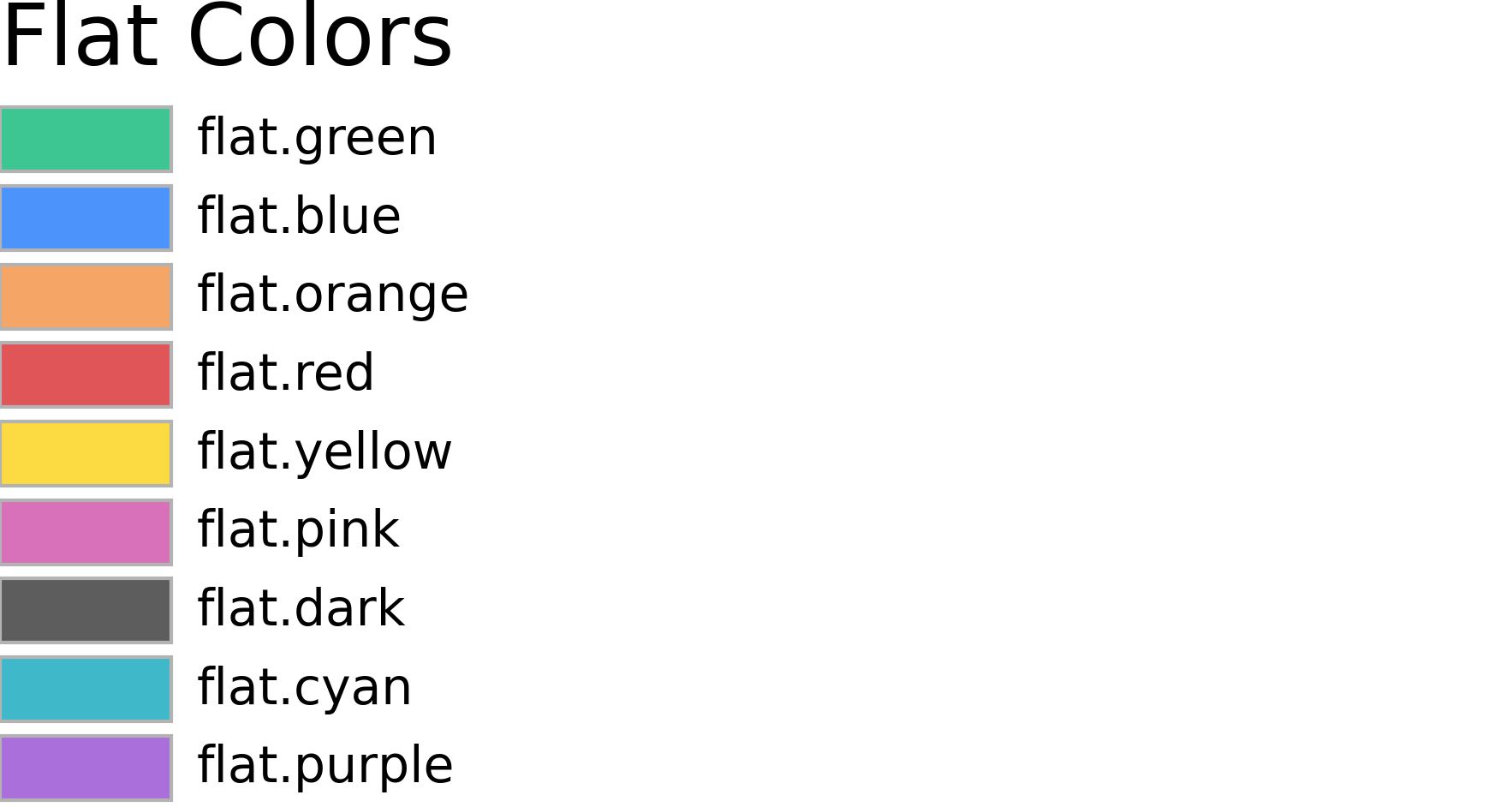
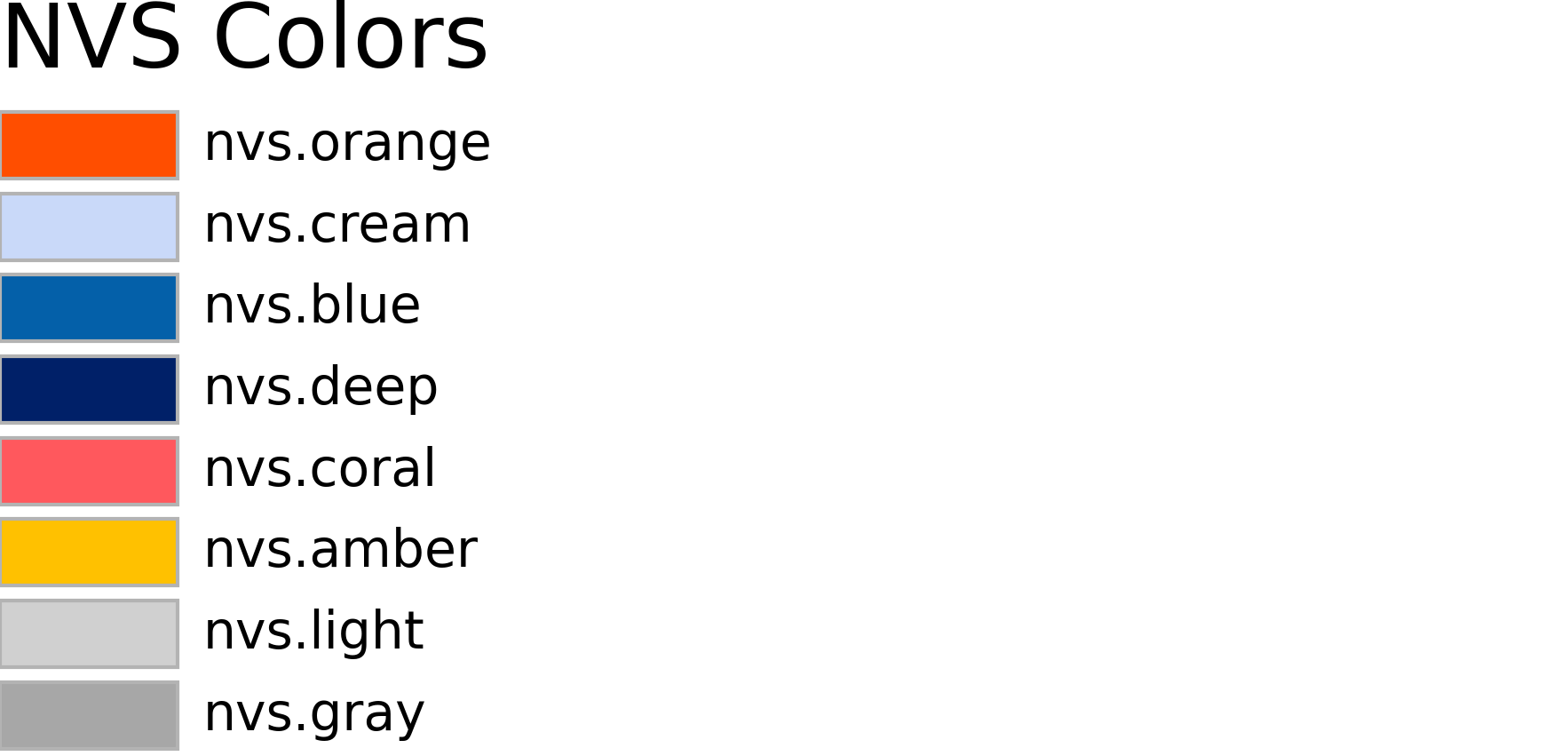
- class flat.coloring.Color(color=None)
Converts and manipulates common PyMOL color representation: colorname, RGB, or HEX. PyMOL API only.
- static hex(string: str)
HEX color constructor method :param string: Hex color string [0, 255] :type string: str
- Returns:
Color class.
- Return type:
Example
>>> Color.hex("64C8B0")
>>> Color.hex("3F7")
- invert() None
Inverts color :returns: None
Examples
>>> Color.rgb(100, 200, 176).invert()
(155, 55, 79)
- static rgb(r: int | float, g: int | float, b: int | float)
RGB color constructor method :param r: Red color fraction between [0, 255] :type r: int, float :param g: Green color fraction between [0, 255] :type g: int, float :param b: Blue color fraction between [0, 255] :type b: int, float
- Returns:
Color class.
- Return type:
Example
>>> Color.rgb(100, 200, 176)
>>> Color.rgb(0.39, 0.78, 0.69)
- to_hex() str
Return color in HEX format :returns: Color HEX string. :rtype: str
Example
>>> Color.rgb(100, 200, 176).to_hex()
'0x64c8b0'
- to_hsl() tuple[float, float, float]
Return color in HSL format :returns: List of HSL values. :rtype: tuple
Example
>>> Color.rgb(100, 200, 176).to_hsl()
(0.4600, 0.4762, 0.5882)
- to_rgb() tuple[int, int, int]
Return color in RGB format :returns: List of HSL values. :rtype: tuple
Example
>>> Color.hex('64c8b0').to_rgb()
(100, 200, 176)
- class flat.coloring.Palette(*args)
Class for better color palette handling. Behaves same as Python list. PyMOL API only.
- append(object: str | tuple) None
Append object to the end of the list
- extend(iterable: Iterable) None
Extend list by appending elements from the iterable
- insert(index: int, item: str | tuple) None
Insert object before index
- interp(frac: float) Color
Computes the linear interpolation between all colors in palette, if the parameter frac is inside [0, 1). :param frac: Value between [0, 1] at which to evaluate the interpolated values color :type frac: float
- Returns:
Interpolated Color object
- Return type:
result (Color)
Examples
>>> plt = Palette('F00', '0F0', '00F')
>>> plt.interp(0.25).to_hex()
'808000'
>>> nsteps = 10
>>> for i in range(nsteps + 1):
...     plt.interp(i / nsteps).to_hex()
- sort(*, key: None = None, reverse: bool = False) None
Sort the list in ascending order and return None.
The sort is in-place (i.e. the list itself is modified) and stable (i.e. the order of two equal elements is maintained).
If a key function is given, apply it once to each list item and sort them, ascending or descending, according to their function values.
The reverse flag can be set to sort in descending order.
Read more about [color sorting](https://www.alanzucconi.com/2015/09/30/colour-sorting).
- Parameters:
key (expr) – A function to specify the sorting criteria(s)
reverse (bool) – Will sort the list in descending order
Example
>>> plt = Palette('0F0', 'F00', 'F0F', '00F', 'FF0', '0FF')
>>> plt.sort(key=lambda x: colorsys.rgb_to_hls(*x))
>>> print([c.to_hex() for c in plt])
['ff0000', 'ffff00', '00ff00', '00ffff', '0000ff', 'ff00ff']
- flat.coloring.cbalpha(selection='all', *, _self=cmd)
- DESCRIPTION
Color residues by C-alpha atom.
- USAGE
cbalpha [ selection ]
- ARGUMENTS
- selectionstr, optional
Atom selection.
- flat.coloring.cbattr(selection='all', attributes=None, *, _self=cmd)
- DESCRIPTION
Color by residue by attributes: negative (red), positive (blue), polar (green), nonpolar (yellow), and/or special (gray).
- USAGE
cbattr [ selection [, attributes ]]
- ARGUMENTS
- selectionstr, optional
Atom selection.
- attributesstr or list, default = None
Attributes to color, where None colors all.
- EXAMPLE
>>> cbattr('all', ['negative', 'positive'])
- flat.coloring.cbc(selection='all', *, _self=cmd)
- DESCRIPTION
Color by chains.
- USAGE
cbc [ selection ]
- ARGUMENTS
- selectionstr, optional
Atom selection.
- flat.coloring.cbe(selection='all', *, _self=cmd, **kwargs)
- DESCRIPTION
Color by elements. By default skips coloring carbons.
- USAGE
cbe [ selection [, … ]]
- ARGUMENTS
- selectionstr, optional
Atom selection.
- kwargsAny
Define color for each element.
- EXAMPLE
>>> cbe('all', 'C'='green', 'oxygen'='red')
- flat.coloring.cbi(selection='all', palette='rainbow2', *, _self=cmd)
- DESCRIPTION
Color each chain in selection by residue index.
- USAGE
cbi [ selection [, palette ]]
- ARGUMENTS
- selectionstr, optional
Atom selection.
- palettestr, default = ‘rainbow2’
Palette name or space separated list of colors.
- flat.coloring.cbo(selection='all', *, _self=cmd)
- DESCRIPTION
Color by objects.
- USAGE
cbo [ selection ]
- ARGUMENTS
- selectionstr, optional
Atom selection.
- flat.coloring.cbs(selection='all', palette='rainbow', repr='ribbon', *, _self=cmd)
- DESCRIPTION
Color object by state. Experimental and very finicky.
- USAGE
cbs [ selection [, palette [, repr ]]]
- ARGUMENTS
- selectionstr, optional
Atom selection.
- palettestr, default = ‘rainbow’
Palette name or space separated list of colors.
- reprstr, default = ‘ribbon’
Molecule representation to color.
- EXAMPLE
>>> set all_states, 1
>>> show_as ribbon
>>> cbs all
>>> cbs all, red blue
>>> cbs all, repr=cartoon
>>> cbs all, undo
- NOTES
Due to how PyMol handles states only one representation can be colored at the time. To undo the coloring use undo as palette.
- flat.coloring.get_colors(selection='all', *, quiet=1, _self=cmd)
- DESCRIPTION
Get color of atoms in selection. Returns list of indices and RGB tuples.
- USAGE
get_colors [ selection ]
- ARGUMENTS
- selectionstr, optional
Atom selection.
- RETURNS
- : List(Tuple(int, Tuple(int, int, int)))
List of tuples containing atom indices and RGB color tuple.
- flat.coloring.set_color_palette(scheme, *, _self=cmd)
- DESCRIPTION
Set elements color palette. Supported palettes:
jmol
[more coming soon]
- USAGE
set_colors scheme
- ARGUMENTS
- schemestr
Available color scheme.